Duplicates and look-alikes
A perceptual descriptor from Vision, not a checksum — so the burst of eleven near-identical shots groups together even after a crop, an exposure tweak or a re-compression.
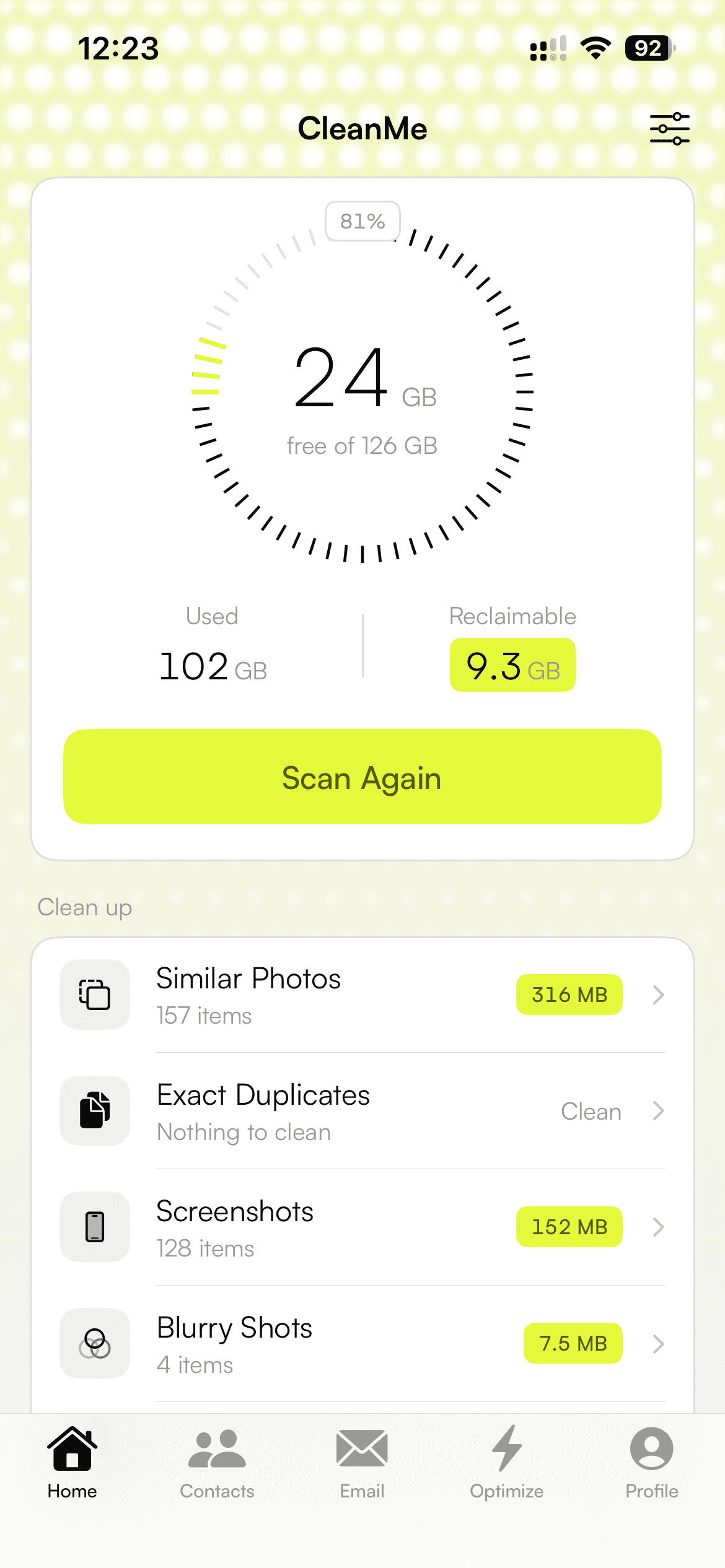
CleanMe finds what is genuinely reclaimable — near-duplicate shots, dead screenshots, blurred frames, oversized video, duplicate contacts and duplicate files — and tells you the truth about the rest. Nothing is uploaded. Nothing is deleted behind your back.
One email when it ships. Nothing else, ever.
iOS reserves this album. No app can empty it.
leave your phone. No account, no upload, no network call.
over the library. Every category comes off the same scan.
of clutter found: photos, screenshots, blur, video, contacts, files.
Recently Deleted holds what you delete. We say so on the dashboard.
A perceptual descriptor from Vision, not a checksum — so the burst of eleven near-identical shots groups together even after a crop, an exposure tweak or a re-compression.
The receipts, the maps, the two-factor codes. Useful for a day, then pure weight. Separated from real photographs so a screenshot is never judged against one.
Laplacian variance over the same thumbnail: sharp frames swing hard at the edges, soft ones go flat. The soft ones surface, and you decide from a full-screen view.
The clips that actually own your storage. Compress instead of delete — re-encode to a smaller frame, watch the result, then replace only if it still looks right.
Matched on shared number, shared email, then name — where a name-only match applies only if one card has no number at all. Two different John Smiths stay two people.
Byte-identical copies found by size, then a 64 KB probe hash, then a full SHA-256 — so a clean folder costs one stat per file and no reads at all.
iOS sandboxes every app. No App Store app can delete another app's caches, clear “system junk”, or touch files it does not own — the cleaners that claim otherwise are not doing it either. Here is the whole list of what CleanMe cannot do, in the app and on this page.
iCloud Photos syncs a library. It does not back one up. Delete a photo on this phone and it goes from iCloud too — so CleanMe never puts a reassuring “backed up” badge next to a delete button.
There is no API for it. There is also no API that lists your installed apps or their sizes — the private one gets an app rejected, and the public one only reports whether a URL scheme has a handler.
iOS reserves that album. Deleted photos keep occupying space for 30 days, so the dashboard says so rather than letting the free-space figure appear stuck.
Every deletion routes through the system photo library, so iOS presents its own confirmation sheet. There is no silent-delete path, by design.
A photo iOS has offloaded is not local bytes, so removing it frees nothing here. CleanMe measures the split, subtracts it from every total, and shows you the difference instead of quoting a number it cannot deliver.
Decoding a thumbnail per asset is the expensive step, so it happens exactly once and the same 256px bitmap feeds every check. Comparison is windowed by capture time, not all-pairs — a 40 000-photo library stays tractable instead of quadratic.
Ticking a 110pt tile is a guess. Open any photo full size, swipe through the rest of its cluster, pinch to zoom, and select from there — it is the same selection the grid holds, so a photo ticked full screen comes back ticked.
Resolution, file size and sharpness are weighted; edits earn a bonus. Favourites are a tier, not a bonus — a starred photo sorts ahead of everything structurally, so no quality gap can ever outvote it into the delete pile.
Deleting a clip you filmed is a bad trade. CleanMe re-encodes it to a smaller frame into a temporary file, and nothing reaches your library until you have watched the result — original and encode behind one player, seeking to the same frame, so you are comparing a picture rather than two different moments.
Nothing is written to your library until you have watched the encode next to the original.
The scan is free and stays free — every figure, including what lives only in iCloud. Cleaning past the free allowance is what costs money, and it costs it once. The subscription exists for the one job that never finishes: your inbox.
The whole scan, every number, and enough cleaning to prove it works.
Every storage feature, paid one time. No subscription, ever.
Lifetime's storage tools plus the things that keep happening.
Prices are in US dollars and will be set per region on the App Store. Lifetime and Pro can be restored on any device signed in with the same Apple ID.
Because iOS moved those photos to Recently Deleted, where they sit for 30 days and keep occupying storage. No app can empty that album — iOS reserves it. Open Photos → Recently Deleted and delete from there to get the space back immediately. CleanMe tells you this on the dashboard instead of letting the number look broken.
It never deletes anything on its own. It recommends one keeper per cluster and pre-ticks the rest, you review that selection — full screen if you want — and iOS then presents its own confirmation sheet. Favourites are protected structurally: a starred photo always sorts ahead of the others, and a second favourite in the same cluster is left unticked rather than queued.
No, and neither does any other App Store app. iOS sandboxes them all. What is genuinely reachable is your photo library, your address book and folders you hand over through the Files app — which is where the great majority of a full iPhone actually lives.
They are counted separately and subtracted from every reclaimable figure, because bytes that live in iCloud are not bytes a deletion hands back. There is also no API that evicts a local copy while keeping the iCloud one — only Settings → Photos → Optimize iPhone Storage does that, on iOS's own schedule.
You decide, before anything is replaced. The original and the encode play behind one switch, seeked to the same frame, full screen and turned to match the clip's own aspect. If the encode does not hold up, nothing is saved and nothing is deleted.
It is in development now, and the waitlist is the only place the ship date will be announced. The scan is free. Cleaning past the free allowance is a one-time $24.99 Lifetime purchase, and the inbox features are a $3.99-a-month Pro plan. No weekly plan, no trial that converts, no ads.
Join the waitlist and we will send exactly one email, on the day it is on the App Store.
One email when it ships. Nothing else, ever.